LiteForex - Forex trading account from 1$

Wednesday, January 30, 2008

Forex Trading Edge — New MetaTrader 4 Broker

Recently I’ve been contacted by the manager of Forex Trading Edge. It’s quite a new Forex broker that started to operate near the end of 2007. Forex Trading Edge is the introducing broker for Forex.com broker. Usually I don’t like to list the introducing brokers as the separate entities, but this one got my attention, because it offers a MetaTrader 4 platform, something that Forex.com is missing. Besides MT4, it also offers original trading platform of Forex.com and the NinjaTrader platform. Payments methods are limited — only wire transfer, checks and credit cards — no e-currencies. Another disadvantage that Forex Trading Edge has is that it’s not accepting citizens of the United Kingdom. But for other Forex traders that wanted to join Forex.com, but prefer MetaTrader 4 over other platforms, this is definitely a good choice.

Labels: , ,

Monday, January 07, 2008

MetaTrader Indicators User's Tutorial

There are many free MetaTrader indicators available on-line, but some people still enounter problems in attaching these indicators to a chart or even compiling them when needed. This simple user's tutorial was made by me for those that want learn attaching custom MT4 indicators.

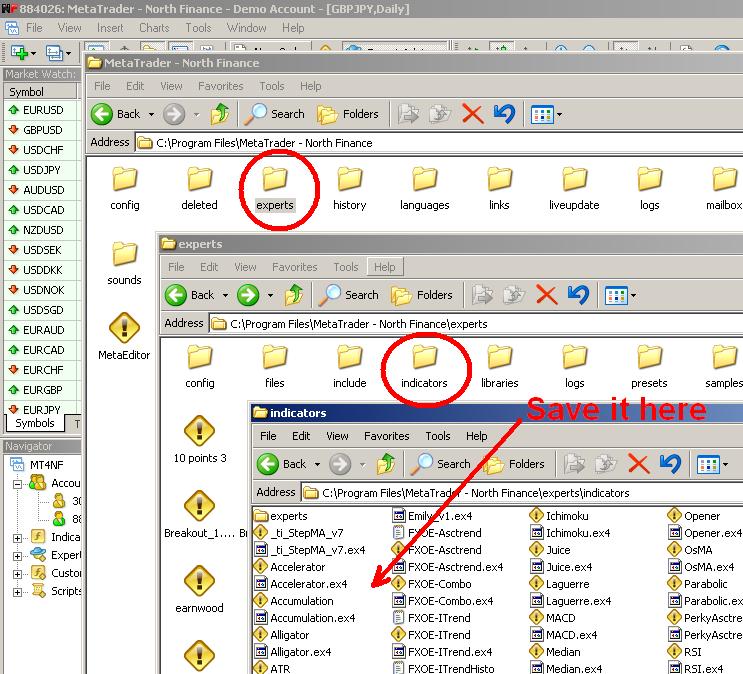
1. Download custom MT4 indicator and save it to the 'indicators' folder inside the 'experts' folder inside your MetaTrader's installation folder:

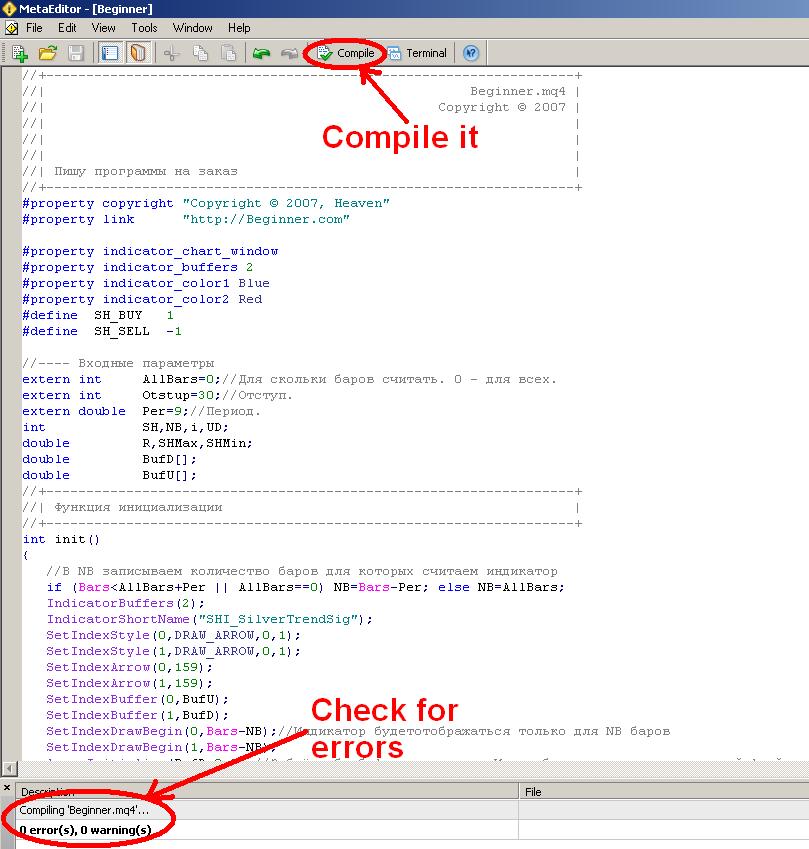
2. If it's already compiled (.ex4 file) then fine, if not (.mql file) - double click it with your mouse and it will be opened in MQL editor (this editor is standard for every MetaTrader 4); click the 'Compile' button at the center top of the editor window - the indicator will be compiled and ready to be attached. There might be some errors or warnings during the compilation, but in most cases there shouldn't be any. You can try and fix those errors, but usually it takes some time and programming skills to do this.

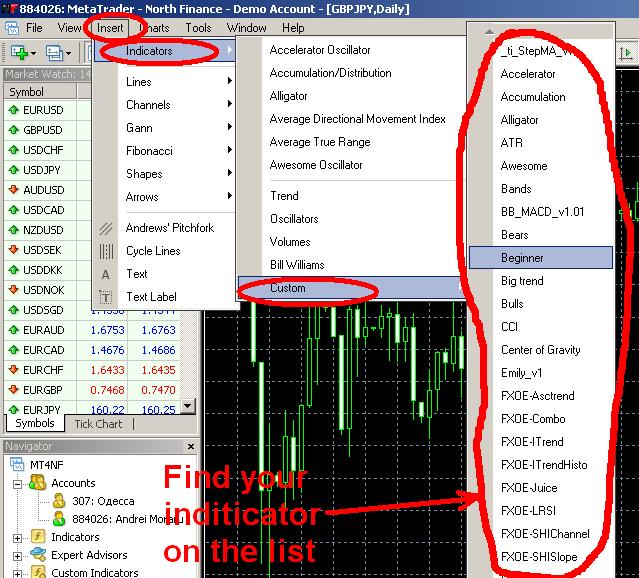
3. After you get the .ex4 file in your indicators folder (through compilation or download), you can start using it with your MetaTrader platform. All you have to do is to attach it to the chart. If you know what you are doing you might also want to change some of the indicator's input parameters.

OK. Now you can enjoy your new MT4 indicator and hopefully - better
Forex trading results.

Labels: , , , ,

Thursday, January 03, 2008

MetaTrader History Data Importing and Converting Tutorial for Quality Backtesting

Backtesting MetaTrader expert advisors on historical data is a good way to test a strategy. But testing on the limited data supplied with MT4 installation gives a very poor quality of testing (usually below 50%). So, how to achieve a 90% quality in backtesting of MT4 expert advisors? It's not that hard really, just follow this simple tutorial and you will able to test any MetaTrader EA.

1. Download a new MetaTrader 4 installation and install it to a separate folder. Be advised that a good MetaTrader historical data take up a lot of disk space, so install it to a drive with at least 1-2 Gbytes of free space. For download MT4 installation I recommend official MetaQuotes site.

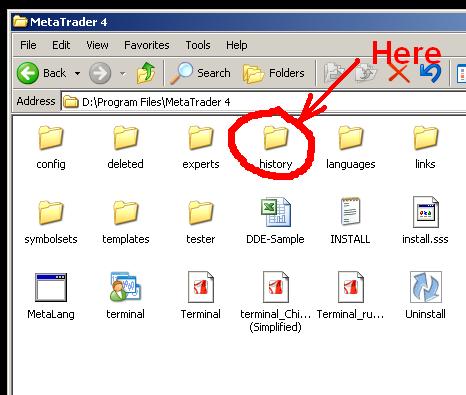
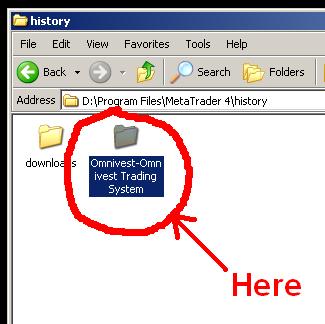
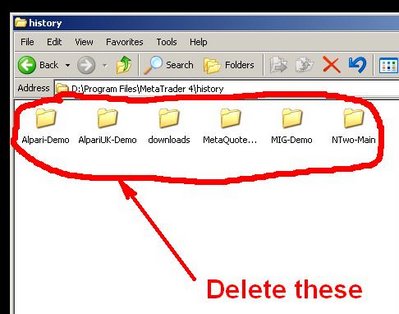
2. After you install your MT4, don't run it yet. Go to the folder you have installed it to. Go the 'history' folder there and delete all folders there (the actual folders names inside the 'history' folder may be different from those on these pictures):
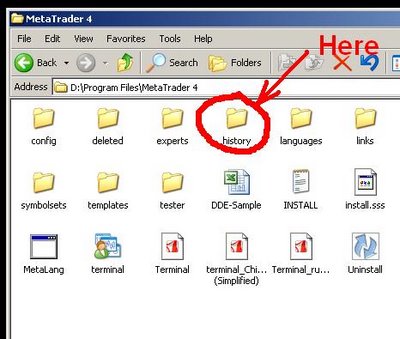
3. Run the newly installed MetaTrader and open a free demo account with whatever broker it will be offering to you (official MetaQuotes installation offers random brokers for demo account opening in its MT4). Login to your account and close all open charts (if any).

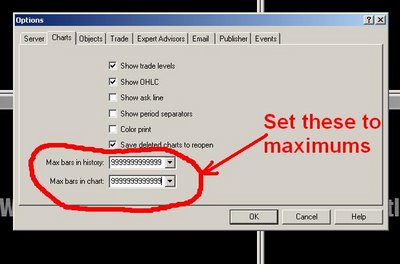
4. Adjust the MetaTrader options to allow larger charts (more bars in history):
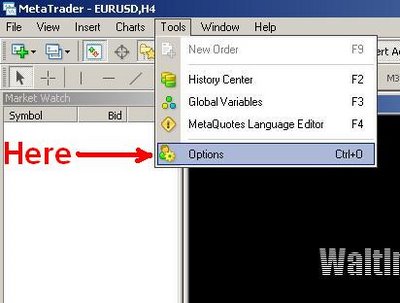
The close your MetaTrader.

5. Download a quality historical data for every currency pair you want to test your expert advisor on. I recommend Alpari History Center for this - download M1 data for each of the currency pairs you need.

6. Unzip the archive with M1 historical data somewhere. Rename it to comply with MT4 standard naming - i.e. EUR/USD M1 chart should be named EURUSD1.hst, GBP/USD M1 should be renamed to GBPUSD1.hst, etc.

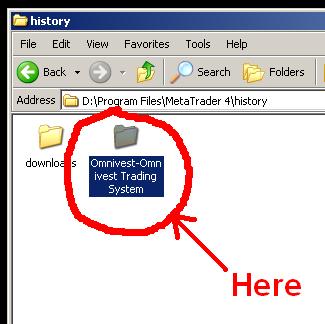
7. Copy the renamed history file to your MetaTrader's 'history' folder into your broker's folder (overwrite if prompted):
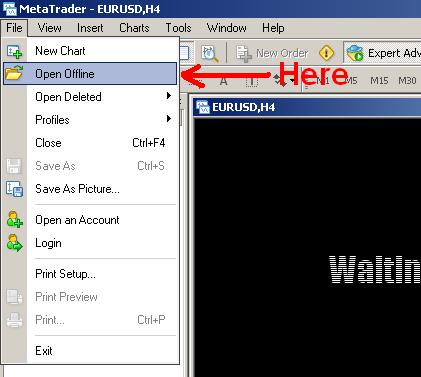
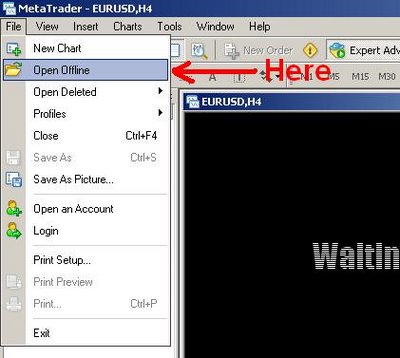
8. Launch MetaTrader 4 again. Don't open any charts on-line, open your downloaded M1 chart offline (example shown for EUR/USD chart):
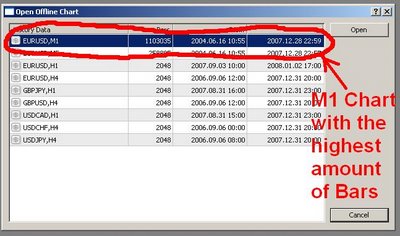
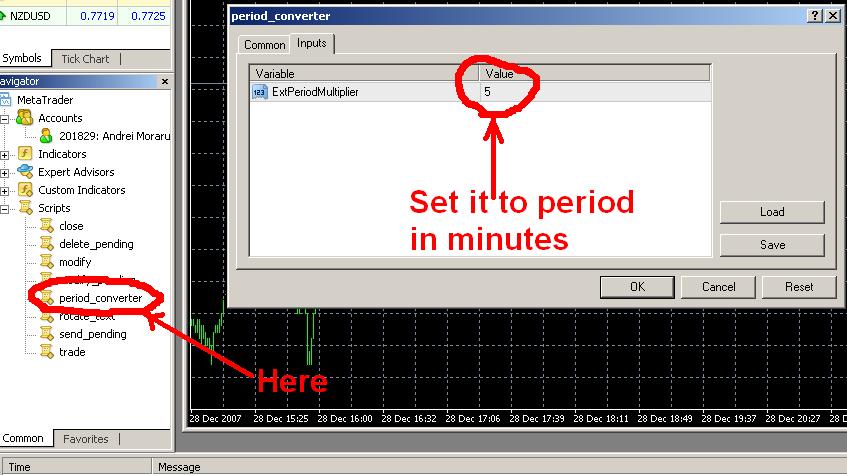
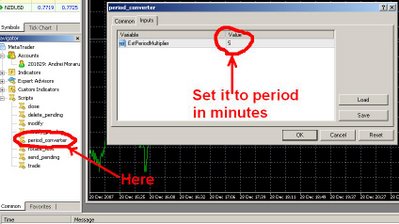
9. It might take some time for the actual chart to load, but it's OK. Now you need to convert M1 history to every timeframe you will need. For this you need to use a period_converter script which is a standard feature of all MT4 platforms. Run it from the Scripts tab and set its ExtPeriodMultiplier input parameter to the number of minutes in the desired output timeframe. For M5 enter 5, for M15 enter 15, for M30 enter 30, for H1 enter 60, for H4 enter 240, for D1 enter 1440, for W1 enter 10080, MN isn't convertible as there is no fixed amount of minutes in one month:
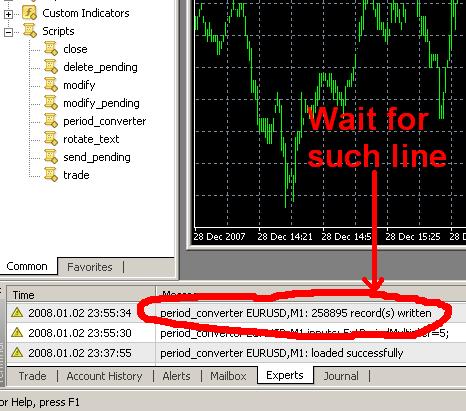
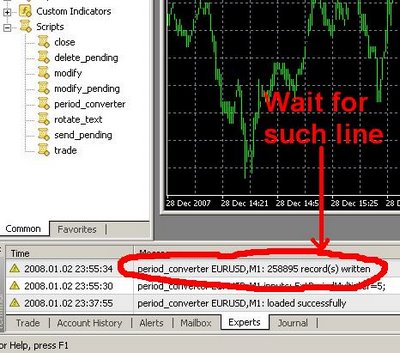
10. Wait for the script to finish its work (may take up some time; it's more than 2 years of data after all):
11. Repeat steps 8-10 for all timeframes you want to get.

12. Repeat steps 5-11 for all currency pairs you want to test your MT4 EAs on.

13. Voilà! Now you can enjoy a 90% quality backtesting and test every expert advisor you want on the time periods of more than 2 years. Good luck with your trading!

Labels: , ,

Tuesday, December 04, 2007

New MetaTrader Indicator

I've added a new MT4 indicator - Var Mov Avg - based on the varying period moving averages crosses. It can be used as a current trend indicator and can be very good on the trendy markets. On the flat market it will show some bad picture, but it can be filtered out. This indicator also produces a sound alert every time it detects a trend change.

Labels: ,

Monday, December 03, 2007

MetaTrader 4 Expert Advisors and Indicators

I've reworked the MetaTrader expert advisors page gradually, removing more than a half of the expert adviors that were poorly tested earlier and aren't profitable according to my new test results. I've been testing all the expert advisors on the period from 11/19/2006 to 11/19/2007 and EAs that were successful on this period I also tested on a 11/19/2004 to 11/19/2007 period to confirm their results stability. All backtests had 90% testing quality. The descriptions of the expert advisors now include the test results and my own notices reg their use.

Another change to the site - I've added MetaTrader indicators page which will contain free MT4 indicators available for download. Right now it holds only 5 indicators, but more will be added soon. All indicators have their own description.

Labels: , ,

Monday, November 05, 2007

New Metatrader Broker - iTradeFX

I've added a new MetaTrder 4 Forex broker to the Forex brokers section today - iTradeFX. It's not a new broker to the on-line market, in fact it offers trading services since 2004, but it is a new broker to my site. iTradeFX has its own trading platform - WinTrader (along with a more common MetaTrader 4), which in my opinion is much inferior to MT4, though I'm sure it is quite popular among beginner Forex traders. Another good thing about this broker is that it is NFA member and regulated by CFTC, meaning that the funds deposited will be less likely to disappear.

Labels: , , , , ,

Tuesday, August 07, 2007

FXDD - Forex Trading Broker Since 2002

FXDD is a new broker which I added to Metatrader 4 Forex brokers and PayPal Forex brokers categories. It is present on the on-line Forex trading services market since 2002. But nevertheless it is still unregulated and is not registered with any major financial regulatory organization. With FXDD you can open mini Forex accounts with $500 and use either MT4 trading platform or their own platforms (they have two of them). Unfortunately they don't support e-gold, WebMoney or CFD trading.

Labels: , , ,

Monday, July 23, 2007

MT4 and MT3 Broker

A new Forex broker with quite a long on-line history and good stand (since 2004) was added to the Forex brokers section of a site. FIBOGroup allows CFD and Forex trading via both Metatrader 4 and Metatrader 3 trading platforms. The minimum deposit is $300 and the leverage at which account are set up is 1:200. At FIBOGroup accounts are easily opened on-line, but they don't allow e-gold deposits (closed this option due to the problems with e-gold) - but they may reopen this option in future.

Labels: , , , , ,

Wednesday, July 11, 2007

Metatrader Expert Advisors - User's Tutorial

Using Metatrader expert advisors is simple, but sometimes people get confused with it and after downloading a file with the expert advisor a user might get stuck with it without knowing what to do next. This a simple tutorial on how to attach an expert advisor to Metatrader 4 char and activate it.

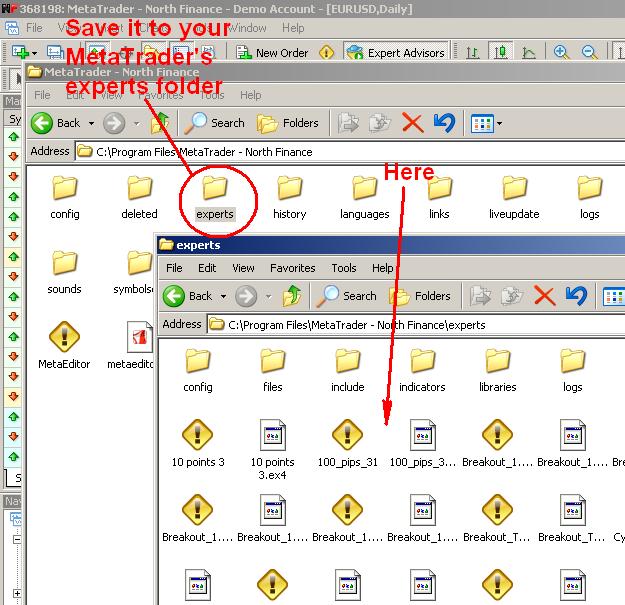
1. Download your MT4 expert advisor or copy it and save it to your Metatrader's 'experts' folder:

Saving Metatrader 4 Expert Advisor
2. Double click it with your mouse and it will be opened in MQL editor (this editor comes with MT4). There will be a button 'Compile' at the center top of the window. Click it and your expert advisor will be compiled and ready to use. There might be some errors or warnings during the compilation, but in most cases there shouldn't be any. You can try and fix those errors, but it takes time and some programming skills, usually.

Compiling Metatrader 4 Expert Advisor
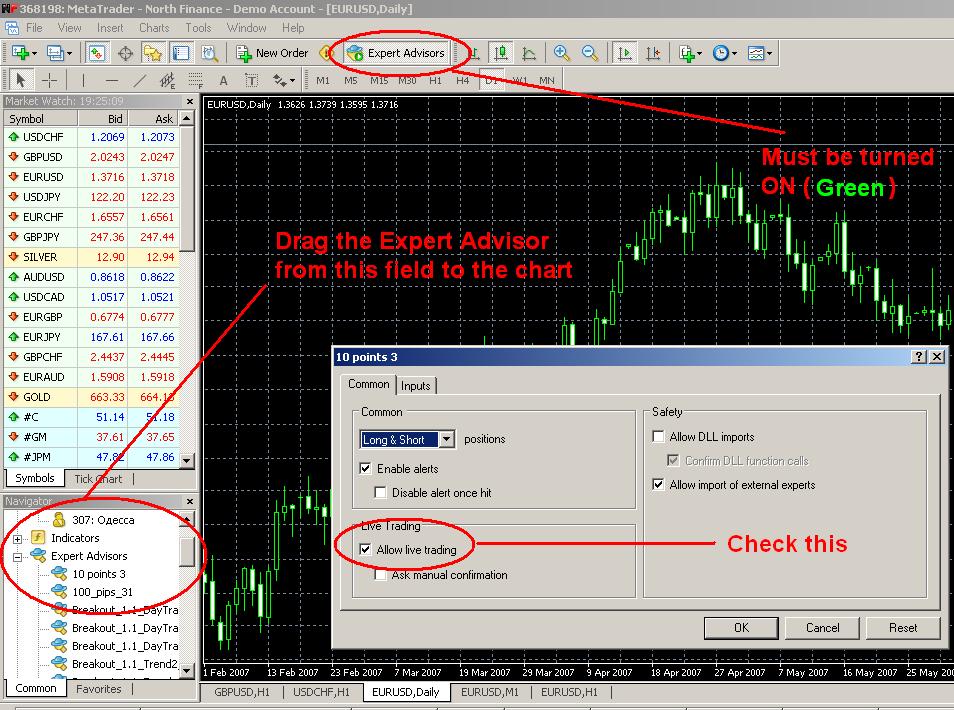
3. Now, all you need to do is add your expert advisor to the preferred chart and activate it. You can also change some input parameters for the advisor in the Inputs tab:

Adding Metatrader 4 Expert AdvisorThat's it! Now you can enjoy your expert advisor - its signals or its trading (if it is designed to perform trading). Good luck with them!

Labels: , , , ,

Tuesday, June 26, 2007

NorthFinance Warns Traders

NorthFinance warns its clients that after July 1st it will stop supporting Metatrader 4 platform versions older than build 200. So, it is about a time to update your Forex trading software if you are trading with NorthFinance. Update can be automatically started on the program startup. Updating your Metatrader 4 platform not only will keep you up to date with NorthFinance, but also will remove some bugs (that are fixed in newer versions) and enhance your experience with expert avisors (that need to be recompiled with almost every build in pre-200 versions).

Labels: , , , ,

Friday, June 22, 2007

ODL Securities – a No Minimum Broker with a $100 Minimum

ODL Securities is a Metatrader 4 Forex broker that states that you there is no minimum account size as well as no minimum amount to deposit, while the actual minimum is not zero – you’ll have to deposit at least 100$ to open the minimum lot size position available with 1:100 leverage. As to deposit options – traders are limited to credit card, check and bank wire. As with some other Metatrader brokers you can also trade CFD, but with ODL Securities you’ll have to open additional trading account specifically to trade CFD.

Labels: , , , ,

Thursday, June 21, 2007

Another MT4 Broker Hits My List

Royal Forex Trading is a relatively new broker that started its services in the end of 2006. It supports Metatrader 4 trading software, but it has not many features to attract Forex traders - $300 minimum deposit (which is not very low compared to some other brokers) and the fact that it is regulated by NFA and CFTC (which can mean a lot to some people, while be insignificant to others). To start trading with them you’ll need to deposit money with one of the following ways: PayPal, BPS, Wire Transfer, credit cards or check.

Labels: , , , , , , ,

Sunday, June 17, 2007

SNC Investments – MT4 Broker with Custom Platform

SNC Investments is a Metatrader Forex broker that allows deposits via Wire Transfer, checks and BPS (Broker Processing Service). They utilize a customized version of MT4 platform; though, it is fully compatible with Metatrader (so the expert advisors should work with it without any problems). You’ll need to deposit a minimum of $500 to start trading with SNC Investments. This broker is registered with CFTC and NFA, but, in my opinion, there is many other brokers which deserve more attention than this one :-).

Labels: , , , , ,

Friday, June 15, 2007

Socially Responsible Forex Broker - MIG Investments

MIG Investments is a Forex broker from Switzerland. It is one of the most legally clear broker for the serious traders. I say serious because the minimum account size is $2,000 with the Wire Transfer being the only billing option available. With MIG Investment you can use Metatrader 4 software and trade with their quite competitive spreads. One of the most remarkable thing about this Forex broker is that it shares some of its profits with the UNICEF organization, helping children all over the world. This is indeed a rare occasion that the rich help the poor in such aggressive and speculative industry as Forex trading.

Labels: , , , , ,

Thursday, June 14, 2007

Crown Forex – a Swiss Broker with Metatrader Platform

Crown Forex is a Swiss based Forex broker that supports Metatrader 4 trading software. Though, it greatly limits the use of MT4 expert advisors which almost kills one of the biggest advantages of Metatrader platform. To start trading with Crown Forex you’ll need to deposit a minimum of $300 which can only be transferred via Wire Transfer. But of course you can always try their demo accounts for free.

Labels: , , ,

Tuesday, June 12, 2007

Real Trade – Forex Broker from Latvia

Real Trade is an established Forex broker based in Latvia which offers international Forex trading services using a Metatrader Forex platform. Aside from that Real Trade clients can deposit and withdraw funds to and from their margin accounts using e-gold and WebMoney (along with a good old Wire Transfer). Overall, Real Trade is a reputable (but more popular with Russian-speaking traders) Forex broker with market presence since 2003.

Labels: , , , , , ,

Tuesday, June 05, 2007

FXcast - e-gold Forex Broker with Metatrader 4 Platform

Another e-gold Forex broker with a low minimum account ($1) and e-gold deposit option added to Forex brokers list. FXcast - a quite new broker in the on-line market. It also supports Metatrader platform (for accounts starting from $100) and a very high margin leverage (up to 1:400). One of the major drawdowns for this broker is that it is completely unregulated. But still - good choice for the new Forex traders who store their funds in e-gold or WebMoney.

Labels: , , , , , ,

Monday, May 21, 2007

Additon to MT4 Expert Advisors

I've added a new expert advisor to MT4 Expert Advisors section of the site - myfxovereasy Expert Advisor + FXOverEasy Indicators. It's my own EA based on FXOverEasy indicators, or more exactly - on their combo by Shimodax from StrategyBuilder forum. Actually this Forex expert advisor trades against FXOverEasy strategy, but it showed very good results on EUR/USD M15 chart. But be careful, it is quite risky, don't trade the money you cannot afford to lose. Don't forget to leave your comment if you use this indicator ;-)

Labels: , , , , , ,

Sunday, April 29, 2007

8 Forex Brokers Lists

EarnForex.com now features 8 Forex brokers lists each containing Forex brokers with a special property making it useful to some category of Forex traders. This will help you to find a good broker that would fulfill your needs more easily. The new 8 Forex broker lists are:

Labels: , , , , , ,

Sunday, April 15, 2007

Muslim Forex Brokers

Tadawul FX - a special broker, which provides Forex trading through Metatrader 4 platform and offers special accounts for muslim traders (with no overnight interest). You can get more information about this broker here.

Labels: , , , ,

FXOpen - Forex at its Best