LiteForex - Forex trading account from 1$

Sunday, January 27, 2008

Support and Resistance MetaTrader Indicator

Enjoy the new MetaTrader indicator — Support and Resistance — ready to be downloaded from the indicators page. This indicator shows the dynamic support and resistance levels directly on the chart. It applies the levels to the certain periods that are treated as the trends or sub-trends. This indicator was originally developed by Barry Stander (http://myweb.absa.co.za/stander/4meta/), but I have received by e-mail from one of my reader — Muntazir Mehdi. So, thanks should go to both of them. And I hope to receive and publish even more of such interesting and yet simple Forex indicators.

Labels: , ,

Wednesday, January 23, 2008

Float - New Addition to MT4 Indicators

One of my site's visitors asked me abouth the MetaTrader 4 indicator called "Float". So I've decided to find this one and add it to the MT4 indicators list I maintain. Now everyone can download this interesting indicator and try to use it in Forex trading. It is designed to detect big trend changes and the current trend 'exhaustion level'. As the bonus it also shows the Fibonacci levels on the main chart window to help the traders to determine good support and resistance levels. It would be fair to say that this indicator comes from StrategyBuilderFX forum's members and is currently no longer updated.

Labels: , , ,

Monday, January 07, 2008

MetaTrader Indicators User's Tutorial

There are many free MetaTrader indicators available on-line, but some people still enounter problems in attaching these indicators to a chart or even compiling them when needed. This simple user's tutorial was made by me for those that want learn attaching custom MT4 indicators.

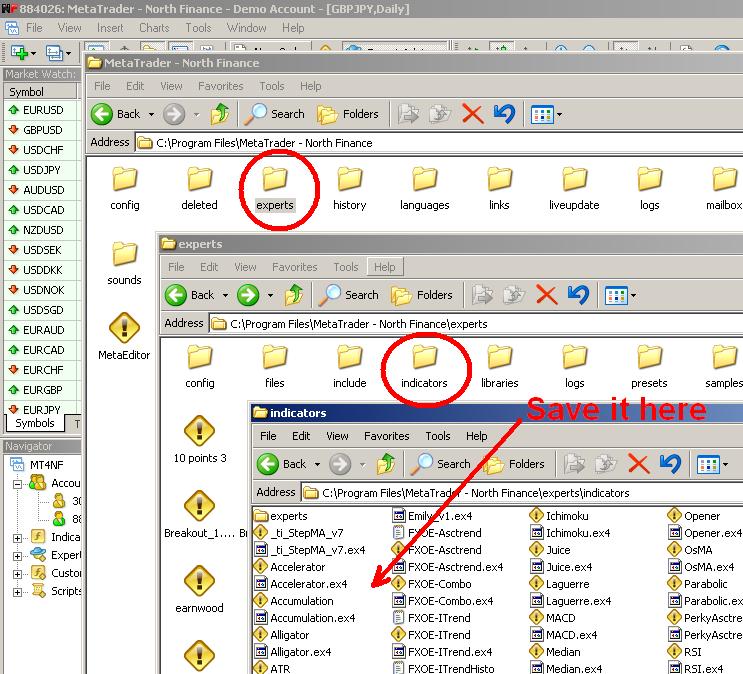
1. Download custom MT4 indicator and save it to the 'indicators' folder inside the 'experts' folder inside your MetaTrader's installation folder:

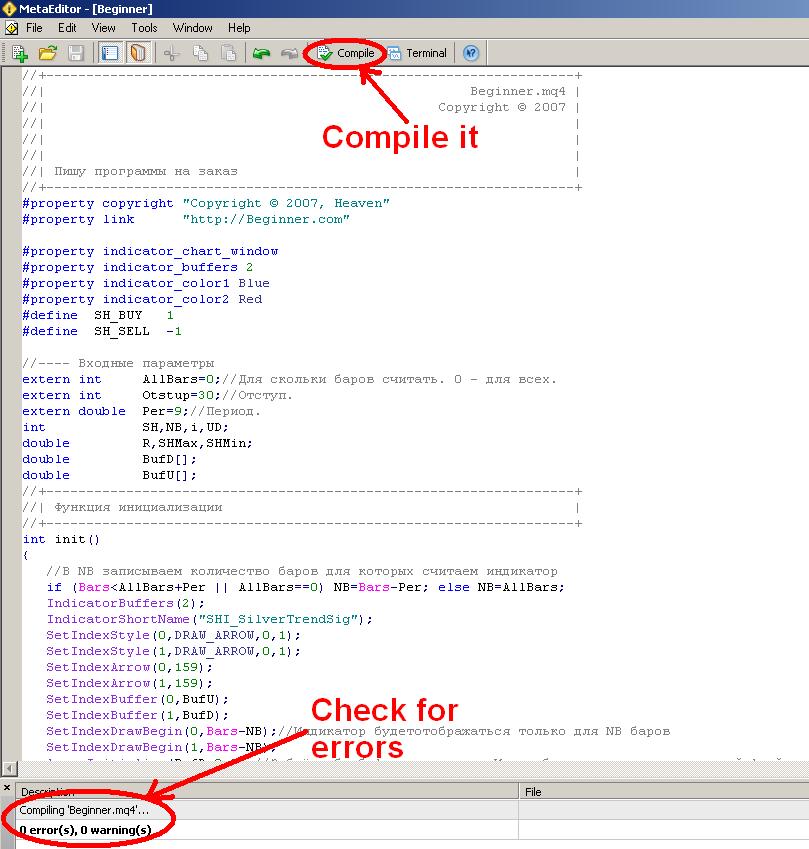
2. If it's already compiled (.ex4 file) then fine, if not (.mql file) - double click it with your mouse and it will be opened in MQL editor (this editor is standard for every MetaTrader 4); click the 'Compile' button at the center top of the editor window - the indicator will be compiled and ready to be attached. There might be some errors or warnings during the compilation, but in most cases there shouldn't be any. You can try and fix those errors, but usually it takes some time and programming skills to do this.

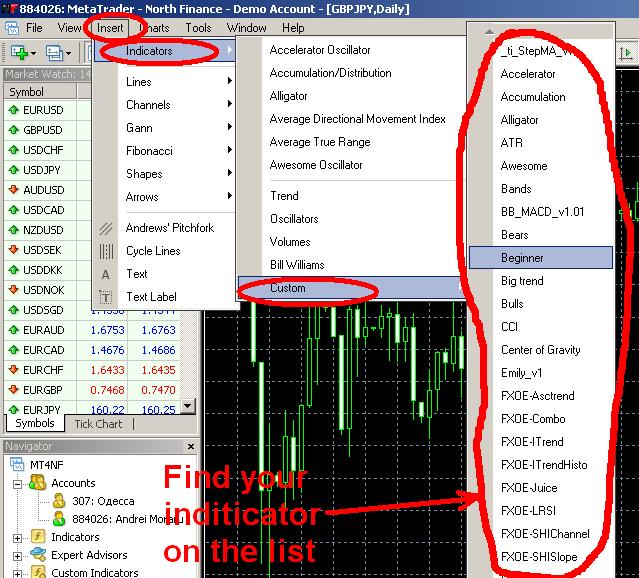
3. After you get the .ex4 file in your indicators folder (through compilation or download), you can start using it with your MetaTrader platform. All you have to do is to attach it to the chart. If you know what you are doing you might also want to change some of the indicator's input parameters.

OK. Now you can enjoy your new MT4 indicator and hopefully - better
Forex trading results.

Labels: , , , ,

Tuesday, December 04, 2007

New MetaTrader Indicator

I've added a new MT4 indicator - Var Mov Avg - based on the varying period moving averages crosses. It can be used as a current trend indicator and can be very good on the trendy markets. On the flat market it will show some bad picture, but it can be filtered out. This indicator also produces a sound alert every time it detects a trend change.

Labels: ,

Monday, December 03, 2007

MetaTrader 4 Expert Advisors and Indicators

I've reworked the MetaTrader expert advisors page gradually, removing more than a half of the expert adviors that were poorly tested earlier and aren't profitable according to my new test results. I've been testing all the expert advisors on the period from 11/19/2006 to 11/19/2007 and EAs that were successful on this period I also tested on a 11/19/2004 to 11/19/2007 period to confirm their results stability. All backtests had 90% testing quality. The descriptions of the expert advisors now include the test results and my own notices reg their use.

Another change to the site - I've added MetaTrader indicators page which will contain free MT4 indicators available for download. Right now it holds only 5 indicators, but more will be added soon. All indicators have their own description.

Labels: , ,

FXOpen - Forex at its Best